


Imagine the evolution of mobile networks as the development of our roadways. 1G was the original dirt road, serviceable for the first mobile voice calls, but heavily limited. 2G paved that road, introducing digital communication and text messaging.
3G expanded the infrastructure into a highway, making mobile internet practical for everyday life. Then, 4G LTE transformed it into a modern, multi-lane expressway, seamlessly enabling video streaming, social media, and high-speed browsing.
5G takes a revolutionary step forward. Rather than simply adding more lanes, it introduces an entirely new, hyper-efficient transportation system for data. The result is massive capacity, ultra-low latency, and the ability to connect countless devices simultaneously.
For homeowners, one of the most exciting breakthroughs of 5G is the ability to access high-speed internet without the need for physical cable or fiber lines. Instead, robust internet service is delivered entirely over the air from a nearby cellular tower directly to the home.
Traditional Home Internet
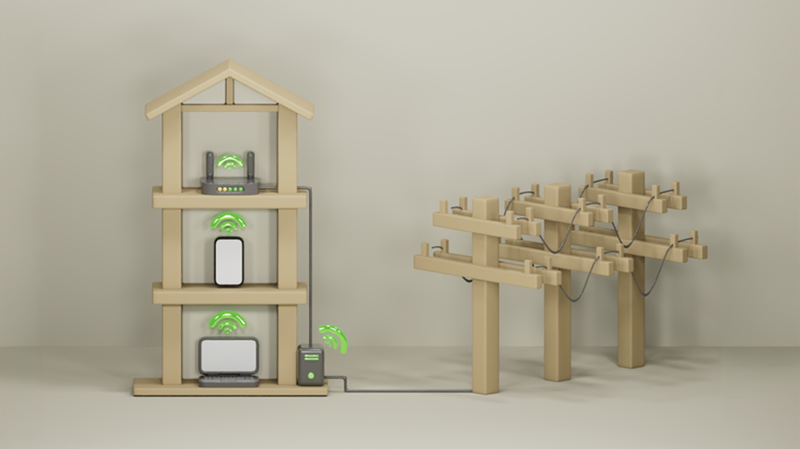
Traditional internet services such as DSL, cable, and fiber rely on physical infrastructure that extends from the provider’s network to your home.
5G Home Internet
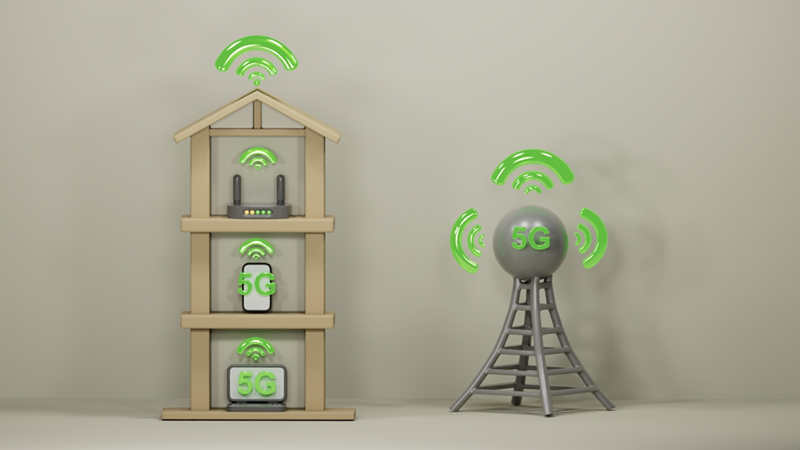
With 5G home internet, the final connection is wireless. A nearby cell tower sends data through the air to a specialized device in your home called a 5G gateway. This gateway functions as both a modem and a WiFi router, distributing internet access throughout your home.
The process is simple:
- Data travels through the provider’s network.
- A nearby 5G tower transmits the signal wirelessly.
- The 5G gateway receives the signal.
- The gateway creates a WiFi network for your devices.
In many cases, setup can be completed within minutes.
One of the biggest advantages of 5G home internet is that it does not require a dedicated cable or fiber line entering your home. This can simplify installation and make service available in locations with limited wired infrastructure.
Depending on network conditions and coverage, 5G home internet can provide speeds ranging from roughly 100 Mbps to several hundred Mbps. In some areas, speeds may exceed 1 Gbps.
These speeds are more than sufficient for:
- 4K video streaming
- Video conferencing
- Online gaming
- Smart home devices
- Simultaneous use by multiple family members
Latency refers to the delay between sending a request and receiving a response.
Lower latency means:
- Faster website loading
- More responsive online gaming
- Smoother video calls
- Better performance for real-time applications
While fiber internet typically offers the lowest latency, 5G can provide a significant improvement over older internet technologies.
Many providers offer self-installation. Simply place the gateway in a location with strong signal reception, connect it to power, and follow the provider’s setup instructions.
This flexibility makes 5G home internet particularly attractive for renters, students, and households that want to avoid lengthy installation appointments.
A 5G connection is an effective backup solution when your primary fiber internet service experiences an outage. If you are working from home, having a reliable secondary network is essential to prevent downtime and keep your workflow uninterrupted.
The process requires specific hardware and network compatibility to ensure optimal performance.
The gateway is the heart of the system. It communicates with the cellular network while simultaneously providing WiFi throughout your home. Most internet providers supply a compatible gateway as part of the service.
If you are using an old SIM card, it likely will not support 5G. Plugging an old SIM into a 5G Gateway may limit your device to a 4G network connection. The SIM must also be actively subscribed to a specific 5G plan, as some providers offer separate tiers to access their 5G services.
Your gateway must be within range of a cellular tower that actively supports 5G infrastructure. Network deployment is ongoing, and not all cellular towers support 5G coverage at this time.
Signal quality plays a major role in performance.
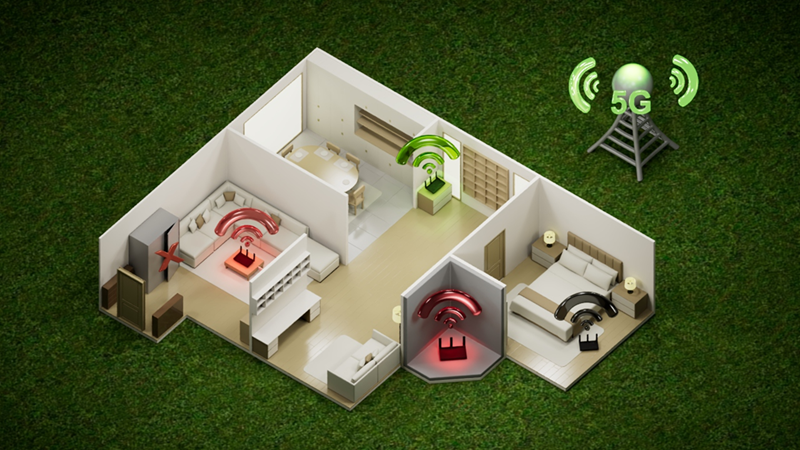
For best results:
- Place the gateway near an exterior window.
- Position it on an elevated surface.
- Keep it away from large metal objects and thick concrete walls.
- Avoid basements whenever possible.
The ideal location is often the side of the house facing the nearest cellular tower.
1. Plug the gateway into a power outlet.
2. Allow it several minutes to connect to the network.
3. Connect your devices using WiFi.
4. For maximum stability, connect desktop computers, gaming consoles, or workstations using Ethernet cables if the gateway provides Ethernet ports.
5. Change the default Wi-Fi name and password to secure your network.
While most major providers require you to use their supplied 5G gateway, it is important to understand the capabilities of the equipment they provide. Whether you are evaluating a carrier's latest gateway or attaching your own secondary router, consider the following features:
A fast cellular connection deserves an equally capable WiFi network. Modern WiFi standards improve performance, efficiency, and device capacity.
▪ 5G technology is still evolving, and many mobile network operators are in different stages of transitioning from Non-Standalone (NSA) to Standalone (SA) 5G. Choosing a device that supports both SA and NSA helps ensure broader compatibility today while providing better futureproofing as networks continue to evolve.
▪ Non-Standalone (NSA): This is currently the most widely deployed form of 5G. In an NSA network, 5G radio frequencies are used to deliver higher data speeds, but the network still relies on the existing 4G LTE core network for signaling and certain control functions. This allows operators to roll out 5G more quickly by leveraging their existing LTE infrastructure.
▪ Standalone (SA): This architecture uses a dedicated 5G core network along with 5G radio access. It unlocks the full capabilities of 5G, including lower latency, improved network efficiency, network slicing, and support for advanced applications such as massive IoT and mission-critical services.
▪ Local Network Status: In many countries, most commercial 5G deployments continue to rely primarily on NSA, although network providers have begun introducing SA in selected areas and for specific services. The transition to a nationwide SA network is gradual because it requires significant investment in new core network infrastructure.
This feature is often neglected by most buyers. Look for a 5G gateway built with a robust heat sink or open-air ventilation for cooling. Connecting to and processing a 5G network is highly process-intensive, which can heat up the device very rapidly. Utilizing a 5G gateway with a good cooling system helps maintain stable performance and extends hardware longevity.
Choose a 5G gateway that explicitly supports VoLTE or VoIP hardware integration. This feature allows you to plug a regular analog handheld telephone directly into the gateway's telephone port. It enables users to make and receive voice calls using your gateway SIM card's phone number while the device remains connected to the internet.
In larger homes, a single gateway may not provide strong WiFi coverage everywhere.
A mesh WiFi system can solve this problem by extending wireless coverage into distant rooms and upper floors. The 5G gateway handles the internet connection from the cell tower, while your mesh nodes distribute that connection seamlessly throughout the property.
As 5G home internet becomes more popular, many homeowners wonder whether a single gateway is enough to meet their needs. Larger homes, home offices, and households with multiple heavy internet users often explore ways to improve coverage, reliability, and performance. One common question is whether installing more than one 5G gateway can help.
- Better coverage: If different parts of the house receive stronger cellular signals from different locations, multiple 5G gateways can improve connectivity throughout the property.
- Network redundancy: If one gateway experiences an equipment failure, another connection remains operational.
NOTE: For true redundancy against network outages, you should use gateways from two different carriers. If both gateways rely on the same local cell tower, an outage will take them both offline simultaneously.
- Dedicated bandwidth: You can assign different users or activities to different connections to reduce the impact of heavy usage.
For example:
- One gateway dedicated to work and video calls.
- Another dedicated to 4K streaming and gaming.
This reduces the impact of heavy usage on a single connection.
- Potentially higher combined capacity: While a single device cannot automatically use the speed of both gateways at the same time, a household benefits from the total combined capacity of multiple internet connections.
- Flexibility in large properties: Large homes, detached buildings, or home offices may benefit from separate gateways if running Ethernet cables across the property is difficult.
- Higher monthly cost: Each gateway requires its own internet plan and SIM card. Monthly costs double quickly. Furthermore, carriers strictly limit how many gateways you can have at a single address to prevent tower congestion.
- More equipment to manage: You will have more devices, power adapters, WiFi networks, and settings to troubleshoot.
- No automatic speed doubling: Two 300 Mbps connections do not automatically become a single 600 Mbps connection. Special networking equipment (like a Dual WAN load-balancing router) is required to combine multiple internet connections effectively.
- Possible signal competition: If both gateways connect to the same nearby tower, they may be competing for the exact same cellular resources. During busy periods, performance gains may be severely limited.
- More complex home networking: Devices connected to Gateway A cannot easily communicate with devices connected to Gateway B over the local network. This complicates:
- Wireless printers
- Smart home devices
- Local file sharing
- Media servers
- The Bottom Line: It often solves the wrong problem. If your primary issue is weak WiFi coverage on the other side of your house, adding a second 5G gateway is usually an expensive and unnecessary overkill. Investing in a high-quality mesh WiFi system or additional access points will solve the problem much more effectively, elegantly, and at a lower long-term cost.
Whether you should switch to 5G Home Internet depends on what you value most.
Here is how to decide:
Choose 5G Home Internet if:
- Convenience is a priority: You want to avoid long installation appointments and drilled holes in your walls.
- You value flexibility: You are a renter, a student, or someone who wants a "plug-and-play" experience.
- You live where options are limited: You want high-speed internet but lack access to reliable fiber or cable infrastructure.
Stick with Fiber/Wired if:
- You require "Zero-Failure" stability: You work in a role where even minor jitter or a momentary signal drop could be a major problem.
- Your environment is challenging: You live in a basement or an area with dense physical obstructions that block cellular signals.
- You want absolute consistency: You need the most stable latency available, regardless of tower traffic or local weather.
For many, 5G provides the perfect balance of performance and freedom. If you have the coverage, it is one of the most convenient ways to modernize your home network.

