


How to access an EasyMesh child node using the Linksys Dual-Band WiFi Router

It is highly recommended not to change anything on a child node. If you decide to change any of the settings, the changes should be made on the parent node. You can access the child node for the following reasons:
-
Check the firmware version
-
Manual firmware update
-
Check or update the Time Zone settings
Follow the instructions below to access the child node.
1. Log in to the web interface of the Linksys Dual-Band WiFi Router you have set as the parent node. For instructions, click here.
2. Click on the Configuration tab.
3. Click on Wi-Fi > Basic Wireless Settings.
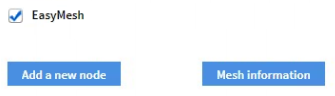
4. Click on EasyMesh information.
2. Click on the Configuration tab.
3. Click on Wi-Fi > Basic Wireless Settings.
4. Click on EasyMesh information.
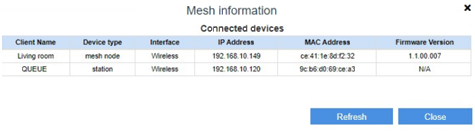
5. Look up the name of the child node you want to access and take note of the IP address. Make sure you know the name you gave it during setup.
There are two sections: the Controller is the parent node and the Agent is the child node. The Controller table will show the clients and child nodes that are wirelessly connected to the parent node. The Living room table is the child node and any clients connected to it will appear in the Agent table. In the example below, the IP address for Living room is 10.0.1.179.
There are two sections: the Controller is the parent node and the Agent is the child node. The Controller table will show the clients and child nodes that are wirelessly connected to the parent node. The Living room table is the child node and any clients connected to it will appear in the Agent table. In the example below, the IP address for Living room is 10.0.1.179.
6. Open another tab on the browser and enter "http://x.x.x.x/ca" which is the IP address of the child node. In the given example, the IP address is http://10.0.1.179/ca. When prompted for the password, enter the admin password of the parent node.
NOTE: For the Linksys E7350 and E8450, make sure your router is on the latest firmware and type in “https://x.x.x.x/ca” in the Address bar. If you run into any browser error messages, click here to continue.
NOTE: For the Linksys E7350 and E8450, make sure your router is on the latest firmware and type in “https://x.x.x.x/ca” in the Address bar. If you run into any browser error messages, click here to continue.
You have now successfully accessed the child node. To manually update the firmware of the child node, click here.
4136

