


Say Hello to the Linksys MBE7000
It is a Cognitive™ Mesh system that provides a fast and secure home network with Fortinet® cyber security built into the system for your home. Linksys Cognitive Mesh technology figures everything out for you by making continuous optimizations that improve your connectivity across all your devices.

- Linksys Cognitive™ Mesh technology
- Tri-band Wi-Fi® 7 BE11000
- 802.11be
- Supports Cognitive Security - Blocks malicious websites and adult content by utilizing Fortinet® Secure DNS and Cisco OpenDNS®
- Wi-Fi Protected Setup™ (WPS)
- 1.5 GHz quad-core Qualcomm® processor
- Supports 2.4 GHz, 5 GHz, and 6 GHz radio bands
- Next-generation Orthogonal Frequency-Division Multiple Access (OFDMA) technology
- Supports parent and child modes
- Buttons and Switch
- Reset button
- One power switch (sliding)
- Ports
- One 2.5 Gbps internet WAN port
- Four 1 Gbps ethernet LAN ports
- One power port
- An active internet connection
- The latest version of the Linksys app
- An iOS or Android™ mobile device
- Linksys MBE7003 (three-pack), MBE7002 (two-pack) or MBE7001 (one-pack)
- One ethernet cable
- One power adapter per node (12V, 2.5A)
- Quick start guide
The hardware version is located beside or beneath the model number and is labeled version, ver., or V. If there is no version number beside the model number on your Linksys product, the device is version 1. If you still have trouble finding your version number, see the complete article to learn more.
Get to know the Linksys MBE7000 and enjoy multiple immersive experiences all at once. With a fast and secure home network, you can stream multiple 8K/4K videos at once, video chat without interruption, play games with real-time responsiveness, and more.
Setting up the Linksys MBE7000
1. Turn ON your Linksys router.
2. Connect your mobile device to the default WiFi.
3. Open the Linksys app.
- Tap Set up New Wi-Fi (iOS)
- Tap Launch setup (Android)
4. Tap Velop and Mesh Routers then follow the on-screen instructions.
Are you still, having trouble setting up your router? Click More for additional help.
1. Open the Linksys App.
2. Log in to the Linksys app dashboard.
3. Tap the menu icon then tap on Wi-Fi Settings.
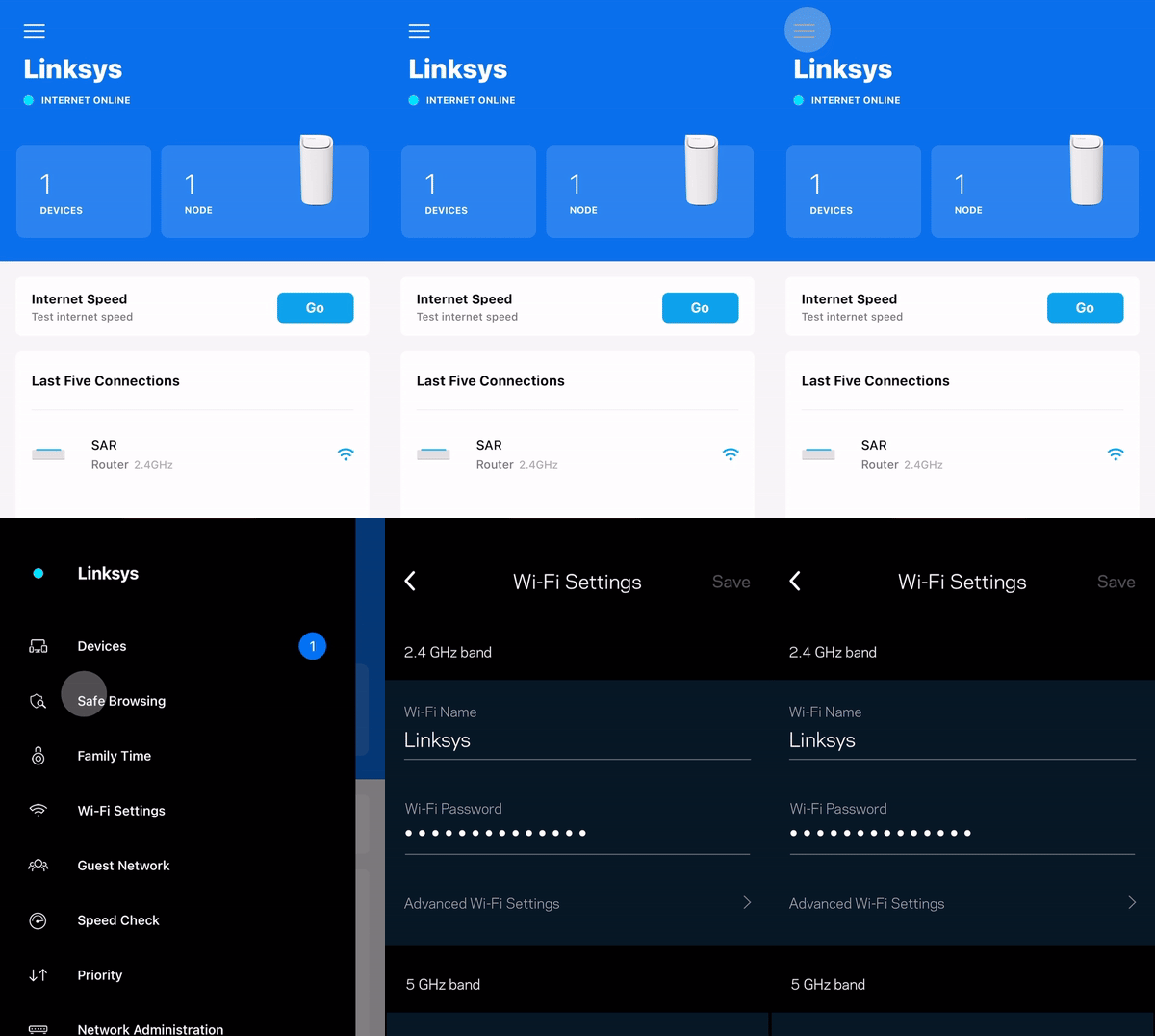
4. Tap the field you want to change on the Wi-Fi Settings and then tap Save once done
1. Press and hold the Reset button located at the bottom of the device.
The top light of the node will flash bright red, pulse dimly three times, flash bright red again, and then turn OFF. You can release the reset button after this process, which takes 10-20 seconds.
2. Wait for the light to turn solid blue, indicating that the node is ready to be set up.
Select each category below to view the articles.
- Setting up the Linksys Mesh node using temporary WiFi with the Linksys app
- How to set up a Linksys Mesh router after a reset
- Setting up a Linksys Mesh system using Bluetooth on your mobile device
- Adding a Linksys Cognitive Mesh child node during initial setup using the Add more nodes option
- Adding a child node to an existing Linksys Mesh system
- Setting up a Linksys Mesh router for PPPoE connection using the Plug-and-Play Setup Wizard
- How to link a Linksys Mesh network to your Linksys cloud account for remote access
- How to add a child node to an existing Linksys Velop Mesh network with Plug-and-Play support

