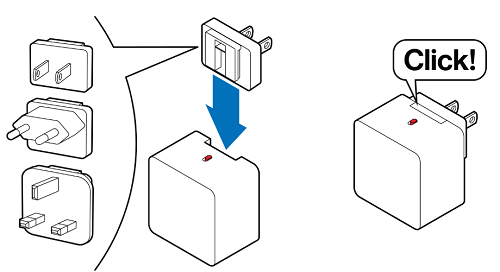
Some Linksys routers come with several accessory plugs, suitable for use in different regions.
Depending on the model, your type of power adapter and accessory plugs may vary. Choose the design of the adapter that best fits your description.
Supported models:
- Linksys LN1600 series (LN1601, LN1602, and LN1603)
- SPNM60
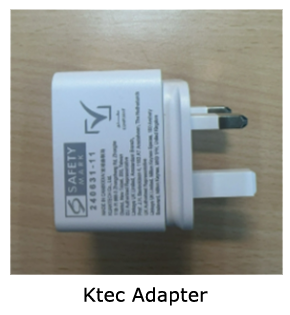
If you need to switch the accessory plug, follow the steps below.
How to remove a plug
1. To remove a current plug, slide the switch in the direction of the arrow (as shown below) while simultaneously sliding the plug upward to detach it.

How to install a plug
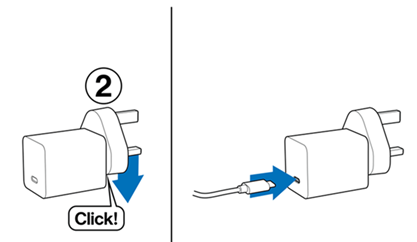
1. Select the plug for your region and then slide it into the adapter until you hear a click sound.
Accessories may vary per region.
2. Connect the supplied USB-C® cable to the adapter and connect the other end of the cable to a Linksys node.

You can now plug the adapter into a power outlet.
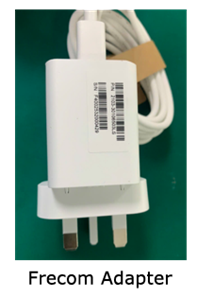
How to remove a plug
1. To remove the plug, simply press on the tab as shown.
2. Slide the plug out as shown.
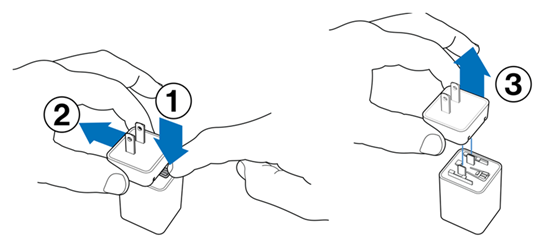
3. Slide the plug up as shown.
How to install a plug
1. Align the adapter to the slots in the plug.
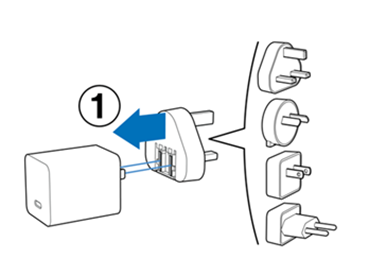
2. Press down on the plug until you hear a click. Then connect the supplied USB-C cable to the adapter.
NOTE: There is an intentional gap to leave space for a tab to remove the plug when needed.