


What they are
A WiFi Extender is a network device designed to broadcast the effective range of a wireless local area network (WLAN). It functions by receiving the signal from a primary wireless router or access point and retransmitting it, thereby extending connectivity to areas that would otherwise experience weak or no coverage.
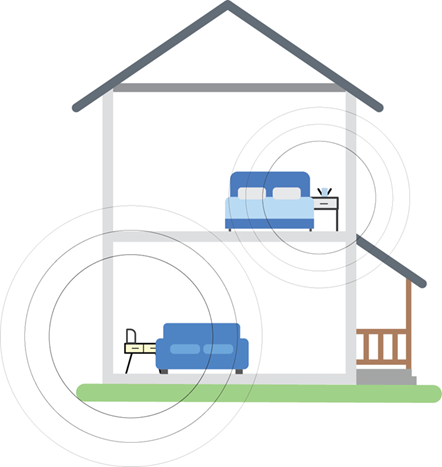
If your router’s WiFi doesn’t reach certain parts of your house, such as the upstairs bedroom or the back porch, the extender captures the signal and amplifies it, allowing you to stay connected.
How they work
Although often compared to routers, extenders operate differently. Rather than managing the entire network, an extender establishes a secondary wireless access point that mirrors the primary network. Devices can then connect to either the main router or the extender, depending on which provides a stronger signal.
Think of your router as a lamp. The lamp shines light, but it does not always reach every corner of the room. A WiFi Extender is like putting up a mirror that bounces the light into darker spots. It does not create brand-new light; it just reflects what’s already there.
Internally, most extenders are equipped with at least two radios or antennas. One is to capture incoming transmissions from the router, and the other is to forward signals to connected devices. This dual-function design allows them to maintain bidirectional communication without requiring physical cabling.
Where to put them
The location of an extender is critical to its performance. It should be placed in a position that still maintains a strong signal from the router while being close enough to extend coverage to underserved zones. Placement in open spaces with minimal physical obstructions, such as walls or large furniture, yields the best results.
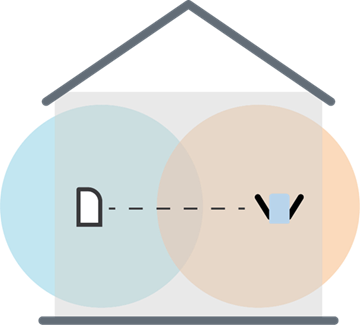
Avoid placing the extender in a dead zone, where there’s no WiFi at all, as it won’t have any signal to amplify. The aim is to put it roughly halfway between your router and the area with poor signal strength. This ensures the extender can both receive and broadcast a reliable connection.
Setup
Most extenders are compact and easy to install. You just plug them into a wall outlet, connect them to your network, and they are ready to go.
Modern extenders are engineered for simplified installation. Many support Wi-Fi Protected Setup™ (WPS) for single-button pairing, while others provide configuration through mobile applications or browser-based interfaces.

Extenders generate distinct WiFi names (e.g., “Linksys_Ext” or Linksys_Ext5GHz), though they usually inherit the security credentials of the primary router.
The newer models
Modern extenders are faster and smarter. Some use Wi-Fi® 6, which is better at handling devices. Others have two bands (2.4 GHz and 5 GHz), so you get less interference. Some have ethernet ports so you can plug devices directly for a stronger connection.
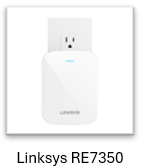
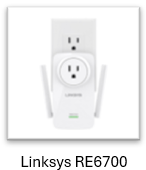
Linksys recommended WiFi Range Extenders:
Potential downsides of using a WiFi Extender
While WiFi extenders can significantly improve coverage in areas with weak signals, they also come with certain limitations that users should be aware of:
1. Compatibility Matters
To achieve optimal performance, the extender’s technical specifications should closely match those of your router.
- Outdated Extender + Modern Router: This pairing can create a bottleneck, limiting the overall network speed and efficiency.
- Advanced Extender + Basic Router: Offers no real benefit, as the extender can only perform to the level of the router it’s connected to.
2. Bandwidth Efficiency
WiFi extenders work by receiving the signal from the router and retransmitting it to other areas.
- This process reduces effective throughput, meaning internet speeds may be slower compared to a direct connection to the router.
- The extender essentially splits its bandwidth between receiving and sending data, which can impact performance.
3. Increased Latency
Because extenders add an extra step in the data transmission process:
- Response times may be slightly delayed, especially noticeable in real-time applications like online gaming, video conferencing, or VoIP calls.
- The signal has to travel from the router to the extender and then to your device, introducing a small but sometimes critical delay.
It’s worth asking: Do you really need a WiFi Extender?
Before investing in a WiFi Extender, it’s worth checking if your router is the problem. Sometimes an outdated router may not cover your space properly. Here’s what to check.
While extenders can help expand coverage, they won’t increase your internet speed. What they can do is help you access the internet in areas your router can’t reach.
You might not need an extender at all if you consider these alternatives:
1. Reposition Your Router
Sometimes, simply moving your router can significantly improve coverage. Here’s why router placement matters.
2. Upgrade Your Router
If your current router is outdated or underpowered for your space:
- Consider upgrading to a newer, more powerful router.
- For larger homes or offices, a Mesh WiFi system may be a better solution. These systems use multiple interconnected nodes to provide seamless, consistent coverage throughout the area.
Check out these Linksys Velop Cognitive™ Mesh systems:

