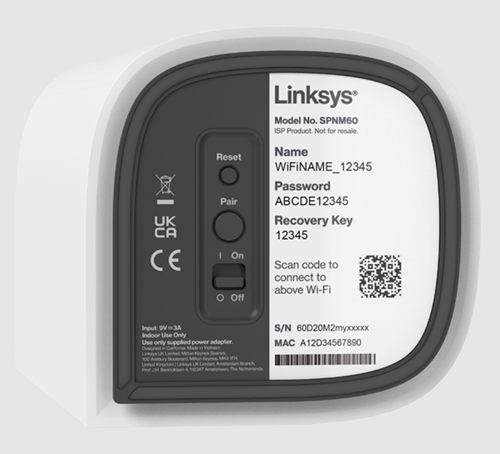
Resetting your Linksys Pinnacle Mesh network is the fastest way to clear glitches, fix connectivity drops, or start a fresh setup. Depending on your needs, you can reset your entire network or target a single device. This guide walks you through two simple methods: using the convenient web interface to manage your whole network at once, or using the physical reset button on an individual node.
Reset through the web interface
1. Log in to your router's web interface.
2. Click on Menu.
3. Click on Instant-Topology.
4. Please read before continuing:
- Reset the parent router and all connected child nodes
- Click on Instant-Actions on the FIRST node, then click Reset to Factory Default. This will reset all your connected nodes in the network. Please note that if you reset the parent router by using the actual button, you will still need to reset any child nodes that were connected. With this option, you can reset your network all at the same time.
- Click on Instant-Actions on the FIRST node, then click Reset to Factory Default. This will reset all your connected nodes in the network. Please note that if you reset the parent router by using the actual button, you will still need to reset any child nodes that were connected. With this option, you can reset your network all at the same time.
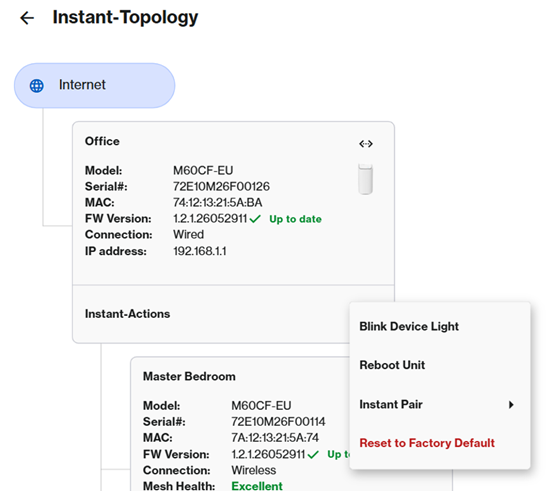
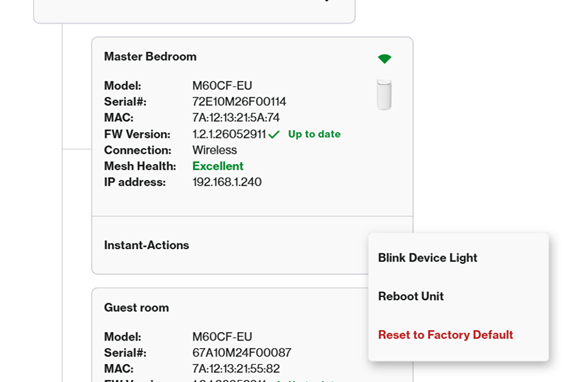
- Reset a child node only - To reset a specific child node ONLY, click on Instant-Actions on the child node you want to reset, and click on Reset to Factory Default. This will reset only the child node you have currently selected.
Reset using the Reset button
To reset a node using its Reset button, hold down the Reset button at the bottom of the router for about 20 seconds. The light will flash red. Wait for the light to turn solid blue, which indicates it's ready for setup.