You are using an unsupported browser. Please update your browser to the latest version on or before July 31, 2020.
close
You are viewing the article in preview mode. It is not live at the moment.
> 登录和密码 > Changing your Velop admin password
Changing your Velop admin password
print icon

This article will help you create or change your router’s admin password through the router's web user interface.

NOTES:  

  • The default password of a Linksys Intelligent Mesh router that has older firmware is admin
  • With the latest firmware, routers that support IMDA no longer use admin as the default password.
  • For Airband ISP subscribers, the default administrator password of an unconfigured Linksys node is admin. After you set up the node or it has an internet connection, the default admin password changes to the unique pre-assigned WiFi password located on the product label.  
  • For Gigaclear ISP subscribers, the default administrator password of an unconfigured Linksys node is admin. Once the node has an internet connection, the password changes to the default WiFi Password (this is case-sensitive) plus the Recovery Key number, located on the product label. 


Images may vary depending on your router. 

1.
Open a web browser to access your router's web interface.
 
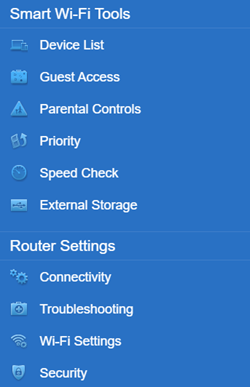
2. Click Connectivity under Router Settings.


Linksys Web interface Menu
 
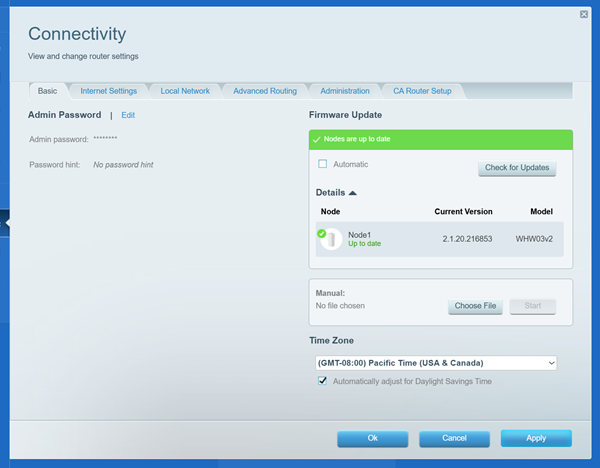
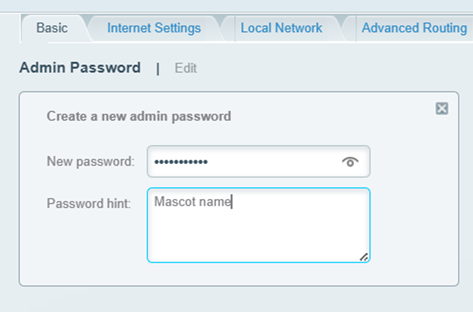
3. On the Basic tab, click Edit next to Router Password and enter your preferred password.

An image of Admin password edit and Firmware update
 
4. Click the Apply button to save the changes.
这篇支持文章有用吗?
0 / 0 觉得这很有帮助

联系我们
致电我们  访问我们的全球支持电话号码列表
Reddit  加入并订阅我们的官方 Reddit 社区
与我们聊天  我们将为您解答所有问题
Linksys
Now
Support
滚动到顶部图标