


How to identify my child nodes in my Linksys Velop system using the Linksys app

The Linksys Mesh WiFi system sends flawless, full-strength WiFi across your entire home.
This article will guide you on how to identify your child nodes, check their details, and identify which node your child nodes are connected to.
Before you begin:
- Parent node: A parent node is a node connected to your modem or gateway.
- Child node: A child node is another node that extends your network.
The steps and images in this article may vary depending on the operating system of your mobile device or the model of your Linksys Mesh system.
Directions
1. Log in to the Linksys app and access the dashboard.
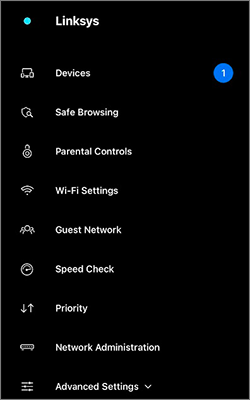
2. Tap the menu  icon on the upper-left portion of the screen.
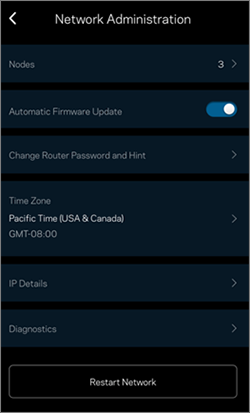
3. Tap Network Administration.
4. Tap on Nodes.
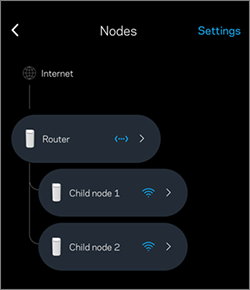
5. Tap on the corresponding child node (e.g. Child node 2) to access additional information regarding a node. You will be taken to the node's page.
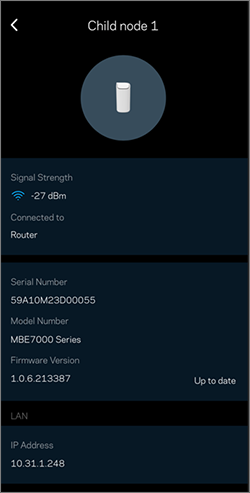
- Signal Strength (Child nodes only) - Displays the Received Signal Strength Indicator of the child node. This feature updates every 10 minutes.
- Connected to xxx where xxx is the name of the node to which your child node is connected. To rename a node, tap on Settings from the Nodes page.
- Serial Number - Displays the unique serial number of your node.
- Model Number - Displays the model number of your node.
- Firmware Version - Displays the firmware version of your node.
- IP Address - Displays the current IP address of your node. The parent node will display both LAN and WAN IP addresses, while the child nodes will only display a LAN IP address.
2024

