


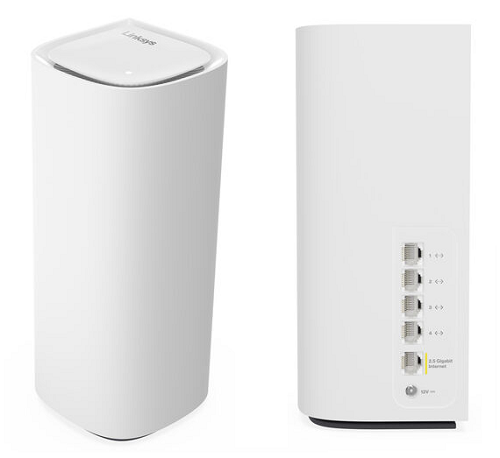
Say Hello to the Linksys MBE7000
It is a Cognitive™ Mesh Wi-Fi® 7 system that provides you with a fast and secure home network with Fortinet® cybersecurity built into the system for your home. Linksys Cognitive Mesh technology figures everything out for you by making continuous optimizations that improve your connectivity across all your devices.
- 802.11be
- Wi-Fi Protected Setup™ (WPS)
- Tri-band BE11000 - Supports 2.4 GHz, 5 GHz, and 6 GHz radio bands
- Supports parent and child modes
- Next-generation Orthogonal Frequency-Division Multiple Access (OFDMA) technology
- Supports Cognitive Security - Blocks malicious websites and adult content by utilizing Fortinet Secure DNS and Cisco OpenDNS®
- Linksys MBE7000PW-HK supports TR069/TR181 and IPTV features
- Buttons and Switch
- Reset button
- Pair button
- Sliding power switch
- Ports
- One 2.5 Gbps internet port
- Four 1 Gbps ethernet ports
- One power port (12V, 2.5A)
- An active internet connection
- The latest web browser version to configure the router settings
- For PCCW subscribers, a PCCW internet connection and an IPTV subscription for the IPTV feature
- Linksys MBE7003 (three-pack), MBE7002 (two-pack) or MBE7001 (one-pack)
- One ethernet cable
- One power adapter per node (12V, 2.5A)
- Quick start guide
The hardware version is located beside or beneath the model number and is labeled version, ver., or V. If there is no version number beside the model number on your Linksys product, the device is version 1. If you still have trouble finding your version number, refer to the complete article for more information.
Firmware
Ver. 1.0.14.216607
Latest Date: 6/26/2025
Download 43.6 MB
IMPORTANT:
- Do not power down the router during the firmware upgrade process.
- For Linksys MBE7000PW-HK (PCCW ISP subscribers), contact your ISP for the latest firmware version.
Setting up the Linksys MBE7000
To set up your Linksys MBE7000 router, follow these steps.
Click More for additional help.
1. Log in to the web interface.
If you are using the Linksys MBE7000PW-HK model, follow these instructions to log in.
2. Click on Wi-Fi Settings.
3. Change your settings according to your preference, click Apply, and then click Ok.
You will temporarily lose your WiFi connection while the settings are being saved. If you’ve changed your WiFi name or password, you’ll need to reconnect using the updated credentials.

1. Press and hold the Reset button at the bottom of the device.
The top light of the node will flash bright red, pulse dimly three times, flash bright red again, and then turn OFF. You can release the reset button after this process, which takes 10-20 seconds.
2. Wait for the light to turn solid blue, indicating that the node is ready to be set up.
Select each category below to view the articles.
- How to set up a Linksys Mesh router
- Setting up the Linksys Mesh node provided by PCCW ISP
- Adding a Linksys Cognitive Mesh child node during initial setup using the Add more nodes option
- Adding a child node to an existing Linksys Mesh system
- Setting up a Linksys Mesh router for PPPoE connection using the Plug-and-Play Setup Wizard
- How to add a child node to an existing Linksys Velop Mesh network with Plug-N-Play support
- Checking the port speed of the Linksys MBE7000
- Manually upgrading the firmware of a mesh WiFi system using a web browser
- Resolving browser error when logging into a Linksys router using an HTTPS connection
- Incompatible nodes found error message
- Linksys Mesh system tips
- How to upgrade the firmware
- How to enable IPTV Configuration on your Linksys router
- Can’t access the router after turning ON the IPTV feature
- Enabling the MLO feature of the Linksys MBE7000 or LN1400 router

