This article will help you create or change your router’s admin password through the router's web user interface.
NOTES:
- The default password of a Linksys Intelligent Mesh router that has older firmware is admin.
- With the latest firmware, routers that support IMDA no longer use admin as the default password.
- For Airband ISP subscribers, the default administrator password of an unconfigured Linksys node is admin. After you set up the node or it has an internet connection, the default admin password changes to the unique pre-assigned WiFi password located on the product label.
- For Gigaclear ISP subscribers, the default administrator password of an unconfigured Linksys node is admin. Once the node has an internet connection, the password changes to the default WiFi Password (this is case-sensitive) plus the Recovery Key number, located on the product label.
Images may vary depending on your router.
1. Open a web browser to access your router's web interface.
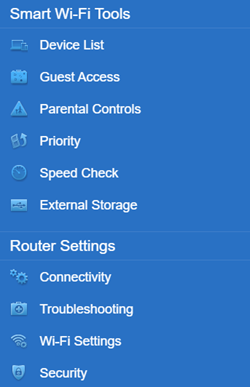
2. Click Connectivity under Router Settings.

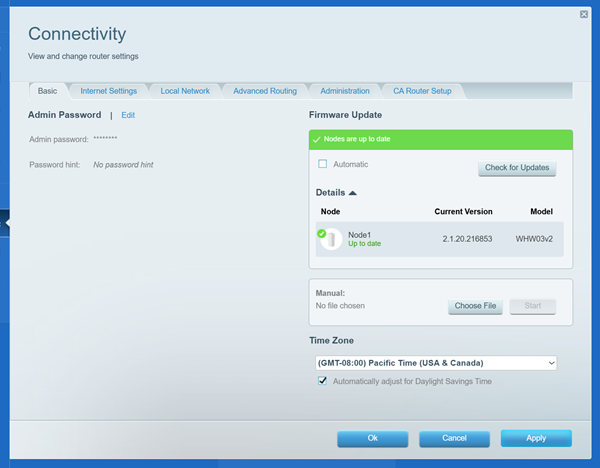
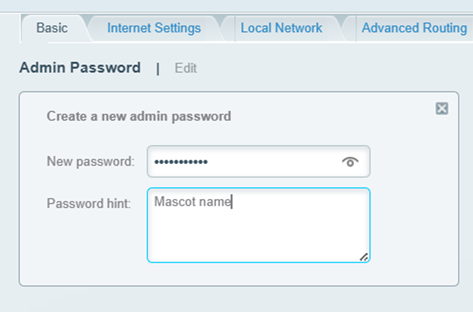
3. On the Basic tab, click Edit next to Router Password and enter your preferred password.

4. Click the Apply button to save the changes.
You should now have changed your admin password.
Find out more:
Changing the Linksys cloud account password via the LinksysSmartWiFi.com page
Changing the Linksys cloud account password using the Linksys app
Customizing the different WiFi bands of your Linksys router