


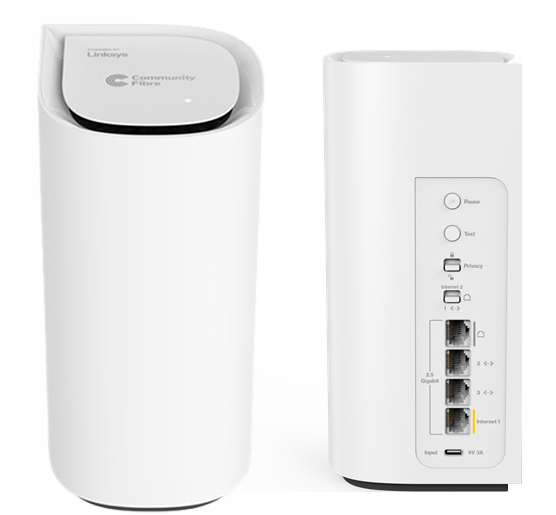
The Linksys SPNM60CF is a Linksys Velop Cognitive™ Mesh router, delivering exceptional performance with dual-band BE5000 and up to 5 Gbps speeds.
HARDWARE INFORMATION
It has the following power supply information:
- Output: 9V, 3A
- Input: 100-240V~50/60 Hz, 1.0A
The Pair button can be useful for adding a child node.
In some cases, it can be used as an alternative method to set up the router. Learn more.
SETUP AND INSTALLATION
No. This model does not support the Linksys app. However, you can set up your network using any mobile device or computer through a browser.
Below are the requirements for setting up the node:
- An active Community Fibre internet connection
- A computer with WiFi enabled or a compatible iOS or Android™ mobile device for setup
- Latest versions of Google Chrome™, Firefox®, Microsoft Edge™, or Safari® (for Mac® or iPad®)
To add more child nodes, here are a few methods available to add a child node.
Below are the default settings of the router:
- The default IP address is 192.168.1.1.
- The default router password of an unconfigured router is admin.
- The default router password of a configured router is the default WiFi password of the parent router.
- The default WiFi name is CommunityFibre10Gb_xxxxx, where xxxxx represents the last five characters of the node’s serial number.
- The default Guest WiFi name is CommunityFibre10Gb_xxxxx-guest.
To configure the Guest feature, follow these instructions.
To change the router password, follow these steps. Learn more.
SECURITY AND PRIVACY
The Linksys SPNM60CF supports the following settings:
- WPA2™/WPA3™ Mixed Personal
- WPA3 Personal Only
- WPA2 Personal (Default setting)
- Enhanced Open Only
- Open and Enhanced Open
- Open
The Linksys SPNM60CF supports both 2.4 GHz and 5 GHz radios.
To protect your family and block predetermined adult websites and illegal or malicious content, enable the Instant-Safety feature. This function will apply to all devices in your network. Follow these steps.
You will temporarily lose your WiFi connection while the change is being applied.
Instant-Privacy prevents new wireless devices from connecting to your WiFi. By default, this feature is OFF.
Before you enable this option, make sure that all devices that you want on the network have first connected to the WiFi. Then you can turn the feature ON. If you need to add new devices, simply turn this feature OFF, connect the new devices to your WiFi, and then turn the Instant-Privacy feature back ON. Learn more.
ADVANCED TROUBLESHOOTING
Remote access is not supported. You will need to be connected to your Linksys WiFi to manage or access your router settings.
No. Use the supplied cable and power adapter to power ON the router.
To reset your router, press and hold the reset button for 15-20 seconds.
While holding the button, the router's light will display a fading red pattern. This pattern will stop after about 10 seconds, and the light will turn OFF. At this point, release the reset button and wait for the router to reboot. Wait for the light to turn solid blue, indicating that the node is ready to be set up.
No, the Linksys app is not supported. You can manage your network using any mobile device or computer through a desktop browser; no app is required.
If clients or child nodes are incorrectly displayed as wired or wireless, or if some nodes appear online when they are actually offline, start by refreshing the page.
If the issue persists, reboot the parent router that's connected to the modem. Wait for the network to come back online, then refresh the page again.
Review the troubleshooting suggestions in this checklist to help fix the issue.
Ensure that the ethernet cable is securely connected to the port, the child node is powered ON, and it is connected to the network. If the issue persists, try using a different ethernet cable.

