


The Linksys Mesh WiFi System gives you a 100% seamless WiFi experience. Linksys Mesh WiFi System makes it easy to give guests access while keeping unwanted guests from connecting to your network.
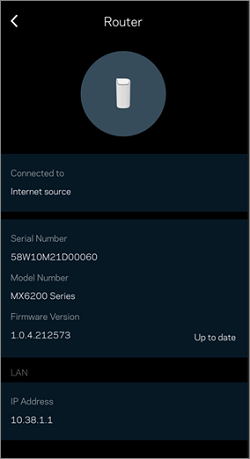
Updating the firmware of your node keeps your WiFi features current and fixes many performance issues. Knowing the firmware version of your node can help you identify if it needs a firmware update. This article will help you check the firmware version of your node.
Before you proceed, make sure to have the latest version of the Linksys app installed on your device. You can download it from the App Store® or Google Play™.
Checking the firmware version using the Linksys app
 icon on the upper-left portion of the screen.
3. Tap on Network Administration.
| iOS | Android™ |
 |
 |
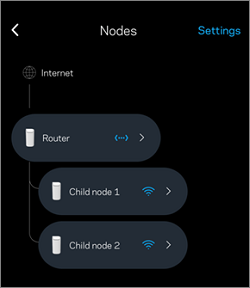
4. Tap on Nodes.
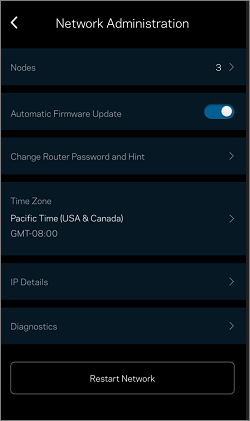
You can also see the Automatic Firmware Update option on this page. To turn ON or OFF automatic firmware upgrades, toggle the switch. By default, this option is turned ON.
Checking the firmware version through the router's web interface
Find out more:
Upgrading the firmware of your Linksys Mesh system

