


Adding child nodes to your Linksys Mesh system through the 5-Press Setup Method

The 5-Press Setup Method is the fastest way of adding child nodes to your Linksys Mesh system using the reset button. Follow the instructions below to know how. You can also watch this video for more details.
Before you begin:
Before you begin:
- Make sure you have a parent node already set up and online.
- Parent node - A Linksys Mesh node connected to your modem.
- Child node - A child node is another Linksys Mesh node/router used to extend your WiFi.
- Status light - The status light of the new child node should be ready for setup mode. The light behavior will depend on the model:
Note that if the light is in any other color, you can reset the new child node that you will be adding.
1. Place the child nodes in the same room as the parent node and at least a foot apart from each other.
2. Power ON the child node and make sure that the light is in setup mode. It should either be solid blue or solid purple, depending on the model.
3. Press the reset button (DO NOT HOLD, otherwise you may end up resetting your network) on the parent node five times within 5 seconds. This will start the pairing process.
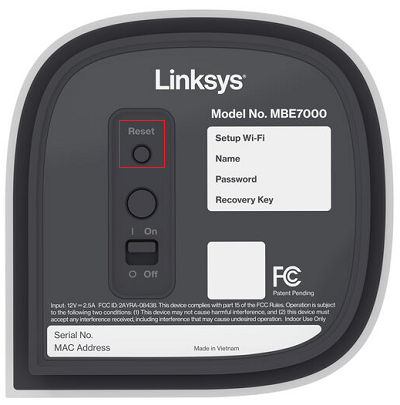
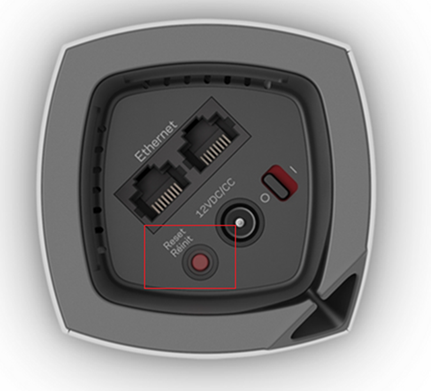
- Within a minute, the child nodes will start responding one after the other (if you're adding more than one).
- The light on top of every child node will start flashing and then display a sequence of color changes.
- After 3 minutes, the child nodes should start showing a solid blue light or a solid white light one after the other, indicating that they have successfully joined your network.
This could take a while, so give the devices enough time to respond. If none of the child nodes are responding, go back to the previous step.
4. Once all the child nodes’ lights are solid, you may place them in your preferred locations.
Find out more:
Adding a child node to an existing Linksys Mesh system

