You are using an unsupported browser. Please update your browser to the latest version on or before July 31, 2020.
close
You are viewing the article in preview mode. It is not live at the moment.
Home > Advanced Configurations > Mesh Systems > How to schedule a pause using Parental Controls or Family Time
How to schedule a pause using Parental Controls or Family Time
print icon

The Parental Controls and Family Time feature lets you create a schedule to block internet access for a device at a certain time and day. You can also create multiple schedules for a device. There are no limitations. To do this, follow the instructions below:


Web interface


1. Open a web browser to access your router's web interface.

2. Choose Parental Controls from the main menu and turn it ON.

3. Pick a device from the list, select Specific Times, and click Edit.
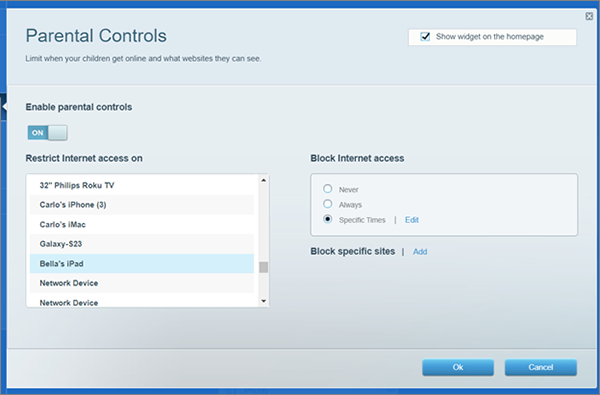

An Image of parental control page

4. Select a schedule to block internet access for the device selected, then click Ok.
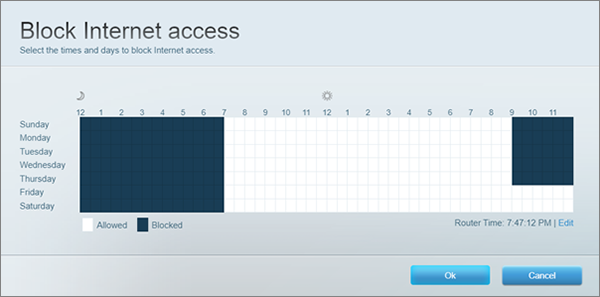
An image of time and days to block internet access

5. Click Ok again to save your settings.
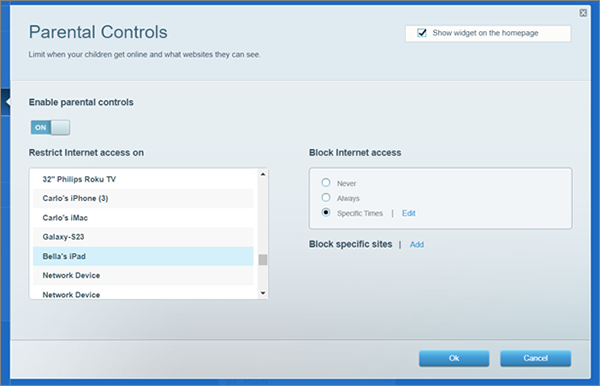
An image of the Parental Controls page showing Bella’s iPad selected to block internet access.


Find out more:
 
How to pause internet access using the Parental Controls feature
Was this support article helpful?
1 out of 3 found this helpful

Contact Us:
Call Us Access our list of global support numbers
Reddit Join and subscribe to our Official Reddit Community
Chat Us We are here to help you with all the questions you have

Linksys
Now
Support
scroll to top icon