


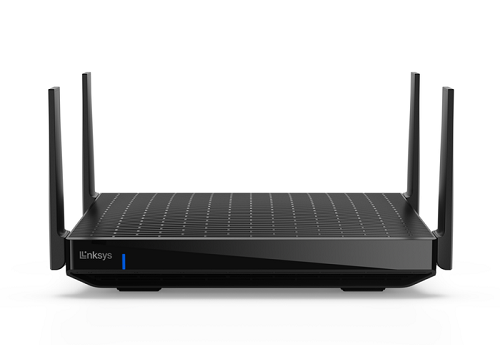
Say Hello to the Linksys MR7500
The Linksys MR7500 is built to elevate your streaming and gaming experience, ensuring faster speeds and more stable connections. Its wide coverage provides seamless WiFi performance throughout your home, allowing for lag-free online gaming and uninterrupted streaming on multiple devices. Whether gaming competitively or streaming in 4K, the Linksys MR7500 ensures smooth, high-performance connectivity across every room and corner, giving you reliable internet access anywhere in the house.
- AXE6600
- Tri-band router
- 2x2x4 Spatial streams
- WiFi security
- Guest network
- Parental Controls
- Supports parent and child mode
- Coverage of up to 2,700 sq ft
- Can be wall-mounted
- Dimensions (L x W x H): 9.96 x 6.77 x 2.16 in (253 x 172 x 55 mm)
- Weight: 2 lb (909 g)
- Buttons and Switch
- Wi-Fi Protected Setup™ (WPS) button
- Reset button
- Power switch (rocker style)
- Antenna
- One internal antenna
- Four external adjustable antennas (non-detachable)
- Ports
- Four ethernet LAN ports (1 Gbps)
- One internet WAN port (5 Gbps)
- Power port
- One USB 3.0 port to support USB drives:
- Supports the following formats: FAT, FAT32, NTFS, and HFS+ (journaled and non-journaled)
- Supports SMB v1.0
- UPnP®
- Supports up to 1100mA current draw
- Supported only when the router is in parent mode
- Active internet connection
- Latest desktop browser to manage router settings - Google Chrome™, Microsoft Edge™, Firefox®, or Safari®
- Linksys Hydra Pro 6E, MR7500
- Quick start guide
- Ethernet cable
- Power adapter (12V, 3A)
- Regulatory and warranty documentation
The hardware version is located beside or beneath the model number and is labeled version, ver., or V. If there is no version number beside the model number on your Linksys product, the device is version 1. If you still have trouble finding your version number, see the complete article to learn more.
- Firmware
- Ver. 1.1.12.216943
- Latest Date: 8/24/2026
- Download 41.8 MB
- Release Notes
- Firmware
- Ver. 1.1.12.216513
- Latest Date: 4/24/2025
- Download 41.8 MB
- Release Notes
You can set up your Linksys MR7500 using the web interface or using the 5-Button push method.
Are you still having trouble setting up your router? Click More for additional help.
1. Open the router’s web interface.
2. Click on Wi-Fi Settings.
3. Change your settings according to your preference, click Apply, and then click Ok.
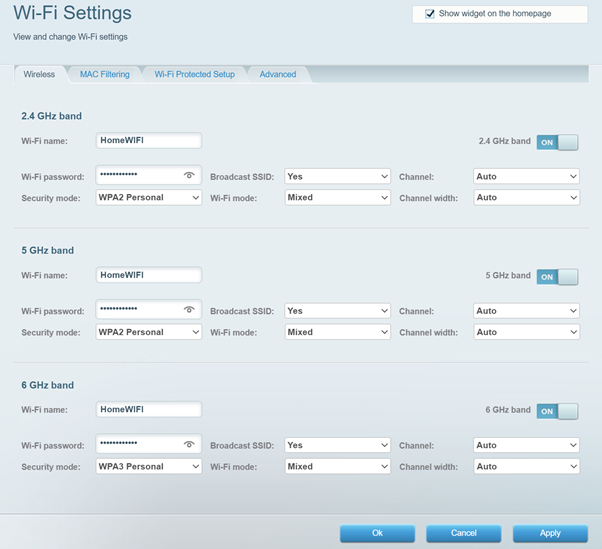
You will temporarily lose your WiFi connection while the settings are being saved. If you updated your WiFi name or password, reconnect using the new credentials.
1. Press and hold the Reset button at the bottom of the device.
The light at the front of the router will flash bright red, pulse dimly three times, flash bright red again, and then turn OFF. You can release the reset button after this process, which takes 15 seconds.
2. Wait for the light to turn solid purple, indicating it is ready to be set up.
Select each category below to view the articles.
- Setting up a Linksys Velop Intelligent Mesh router using a web interface
- Setting up a Linksys Velop Intelligent mesh router using the 5-Button push method
- How to add a child node using the web interface
- Adding child nodes to your Linksys Mesh system through the 5-Press Setup Method
- How to add a wired child node to a Linksys Intelligent Mesh router
- Upgrading the firmware of your Linksys Mesh system
- Resolving browser error when logging into a Linksys router using an HTTPS connection
- How to check if automatic firmware updates are turned ON
- Manually upgrading the firmware of a mesh WiFi system using a web browser
- Incompatible nodes found error message

