


It is recommended that you enable automatic firmware upgrades on your Linksys Mesh WiFi system. Auto-updates for your Linksys Mesh system keep your network up to date with the latest firmware, additional features, and bug fixes.
This article will show you how to upgrade the firmware of your Linksys Mesh system automatically. If you choose, you can perform a manual upgrade instead.
1. Log in to the Linksys Mesh router’s web interface.
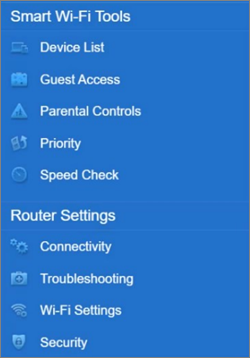
2. Click Connectivity under Router Settings.
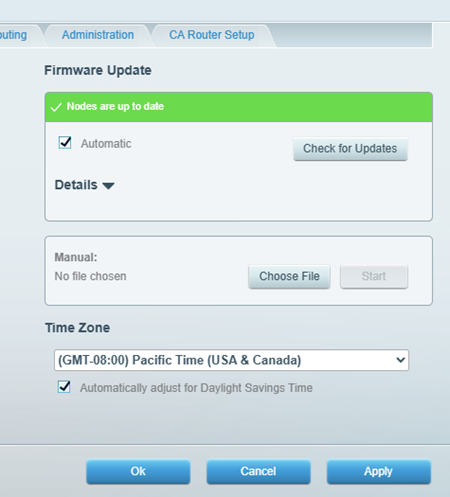
3. By default, the Automatic box is checked to allow automatic firmware upgrades whenever a new version is released. If you have more than one node in your Mesh network, each will be upgraded. If you disable this feature, you will have to click the Check for Updates button to check if a new firmware is available before you can upgrade your device.
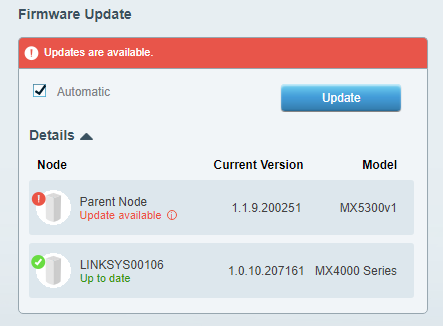
You will be prompted when a new firmware release is available. When this happens, click Update to upgrade the firmware. If you have multiple nodes in the network, click on the arrowhead alongside Details to know which node needs the update.
4. Do not unplug or restart your Mesh system during a firmware upgrade. Wait until the light on your node is solid blue, indicating that your Mesh router is ready.
Find out more:
Manually upgrading the firmware of a mesh WiFi system using a web browser
Setting up your Linksys Mesh system to Bridge Mode
Setting up a Linksys Velop Intelligent Mesh router using a web interface

