


How to enable IPTV Configuration on your Linksys router

If you are a PCCW customer with an IPTV subscription, you can enable IPTV Configuration on the router's web interface to get the most out of your service.
Enabling this feature changes the router’s IP address from 192.168.1.1 to 192.168.10.1, among other changes. Remember to use the new IP address to access the router's web interface in the future.
This article will show you how to enable IPTV configuration and outline the network settings and changes to be aware of.
Before you begin:
- Enabling IPTV configuration changes the default router IP address range from 192.168.1.1/24 to 192.168.10.1/24.
- If you have devices with static IP addresses, you will need to reconfigure them to match the new network range.
- If you manually reconfigure the IP address to something other than 192.168.1.1/24, the LAN IP address will not change.
- If you manually change the LAN IP address back to 192.168.1.1, the IPTV feature will automatically turn OFF.
- This feature only works for active PCCW IPTV subscribers. Please note that enabling this setting will still change your router's default IP address, even if you do not have a valid subscription.
- This feature is not supported for StarHub customers or subscribers on any other Internet Service Provider network.
Directions
1. Connect your computer directly to the router using an ethernet cable, or connect it to the router's WiFi.
3. Click Wi-Fi Settings under Router Settings.

4. Click on the Advanced tab.
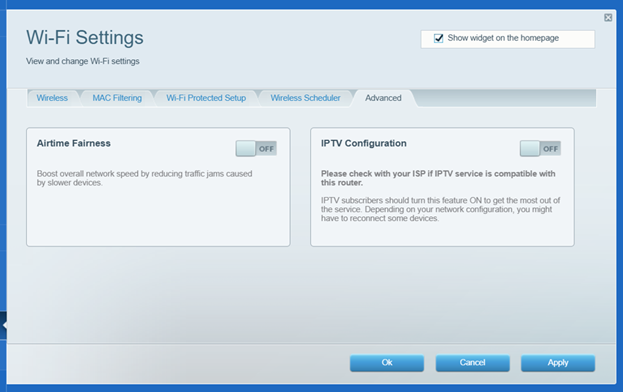
5. Toggle the IPTV Configuration switch to ON.
6. Read the disclaimer, and then click Enable.

7. Then Ok, then Apply to save your settings.
You should now have successfully enabled the IPTV Configuration on your Linksys router.

